32b q4_k_m drops to 3 tok/s at 16k context on a 24gb 3090 vram-fit
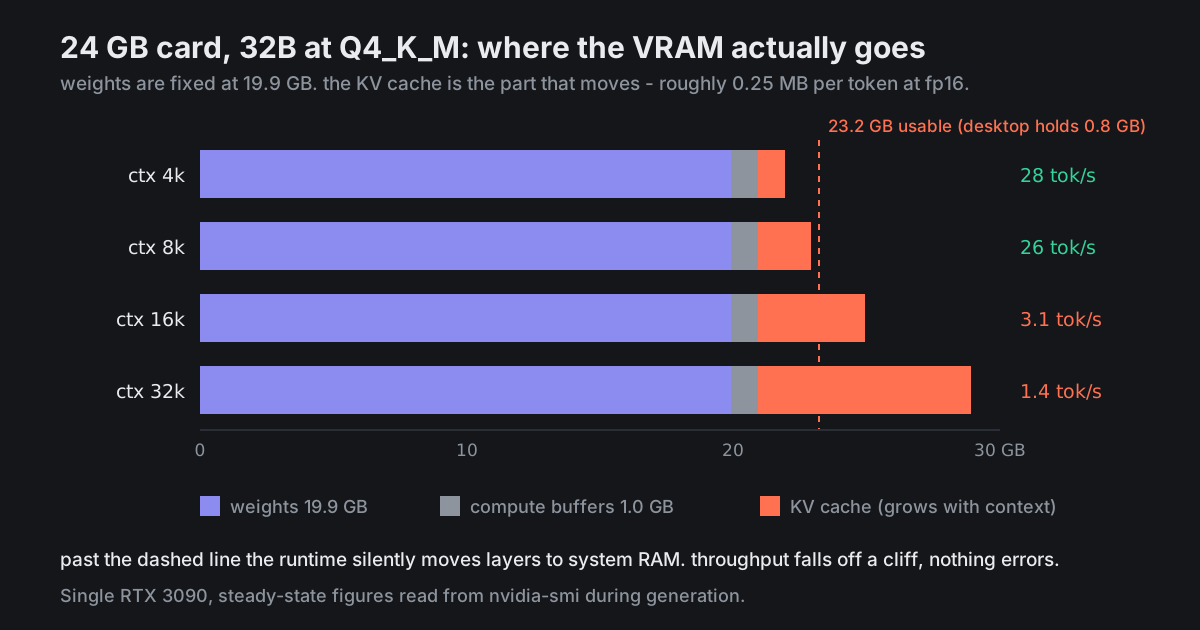
At 4k context I get 28 tok/s and everything is on the card. At 16k the same model gives me 3.1 tok/s. No error, no warning, it just gets slow.
nvidia-smi shows 23.9GB used, and the server log says it offloaded 51 of 65 layers to the GPU instead of all of them. So I understand roughly what is happening - I do not understand why the context length is what pushed it over, since I thought the weights were the big allocation.
What is the actual fix short of buying a second card?
@shoe_resole · 3mo ago · 3 replies
The KV cache is what pushed you over. For a 32B with GQA it is roughly 0.25 MB per token at fp16, so 4k context is about 1 GB and 16k is about 4 GB. Your weights are 19.9 GB and never move; the cache is the variable, and 19.9 + 4 + about 1 GB of compute buffers does not fit in 24.
Cheapest fix, in order:
-fa -ctk q8_0 -ctv q8_0; if you are on Ollama setOLLAMA_FLASH_ATTENTION=1andOLLAMA_KV_CACHE_TYPE=q8_0on the server, not per request.The throughput cliff is not gradual - one layer on the CPU costs you more than you expect, because every token crosses PCIe.
Reply
Report
@teardown_tues · 3mo ago
q8 KV cache plus killing the desktop session got me to 24 tok/s at 16k with everything on the card. That is a 7x from two environment variables.
Reply
Report
@soy_pour_sasha · 3mo ago
Worth knowing where the ceiling is: q8 KV is fine, q4 KV is where people start reporting the model losing track of things early in a long context. If you ever go there, test it on your actual task rather than trusting a benchmark someone posted.
Reply
Report