Ask
174
@couchto5kagain ·

woke up to a $1,940 aws bill on a hobby project, where do i even look Bill Breakdown

Side project. Normally the bill is $30-40. This morning the billing page says $1,940 month to date and there are 9 days left in the month.

I have never had to debug a bill before. The console shows me a giant number and a pie chart with slices called things I do not recognise. I do not know if I have been compromised, if I misconfigured something, or if this is a normal amount of money for something I did on purpose.

What I have: an EC2 instance, an RDS Postgres, some Lambdas, an S3 bucket, and a VPC I set up by following a tutorial and did not fully understand. There is a data processing job that runs hourly and pulls files from S3.

Where do people actually start with this? I have turned off nothing yet because I am scared of breaking the thing.
10 answers Share
Report

Answering anonymously — a moderator will review it first.

  • @kraut_corner · 3h ago · 2 replies

    Second thing to do, in parallel, because it takes two minutes and the downside of skipping it is enormous: rule out a leaked credential.

    • Cost Explorer grouped by Region. Do you see charges in regions you have never used? That is the tell. Nobody accidentally deploys to three continents.
    • Look for EC2 instance types you would never choose - large GPU instances are what compromised keys get used for.
    • CloudTrail, event history, filter on RunInstances and CreateUser for the last 30 days.

    If any of that looks wrong: rotate every access key immediately, check IAM for users and roles you did not create, and open a support case. Do it in that order.

    If everything is in your one region and looks like your own architecture, it is a misconfiguration and you can breathe.

    72
    Share
    Reply

    Answering anonymously — a moderator will review it first.

    Report
    • @dartfit_dana · 3h ago

      And whatever the outcome, this is the moment to turn on MFA for the root account and stop using long-lived access keys anywhere you can avoid them. Most leaks are a key committed to a repository or pasted into a place it should not have been. The bill is the symptom.

      26
      Share
      Reply

      Answering anonymously — a moderator will review it first.

      Report
  • @egress_egon · 3h ago · 3 replies

    Do not turn anything off yet. First find out what it is - it takes about five minutes and guessing costs you more.

    Cost Explorer, then set it up like this:

    • date range: last 30 days
    • granularity: daily
    • group by: Usage Type (not Service - Service will tell you "EC2-Other" and you will learn nothing)

    The daily view is the important part. You are looking for the day the line goes up, because that tells you what you changed. Usage Type tells you what you are being charged for in words specific enough to search.

    On a small account, the top three causes by a mile:

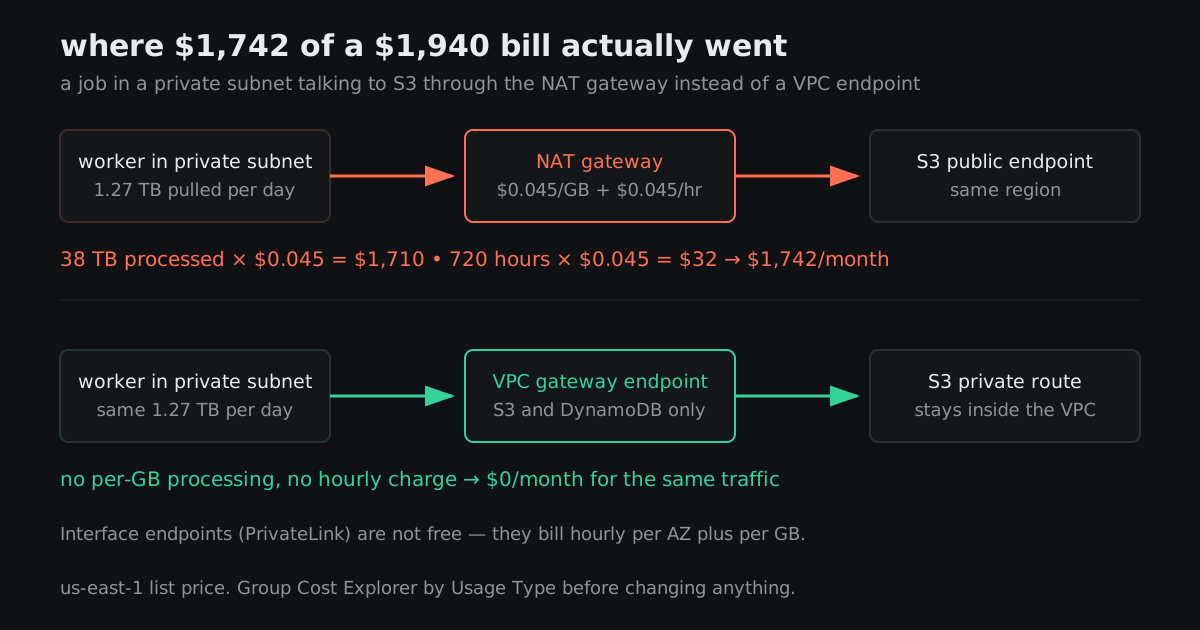
    1. NAT Gateway data processing. Charged per GB through it plus an hourly rate. If your VPC tutorial put your compute in a private subnet with a NAT gateway, then every byte your hourly job pulls from S3 goes through it and gets billed. Same-region S3 traffic that should be free suddenly costs $0.045 a gigabyte. This is the single most common way a hobby account produces a four figure bill, and your description - private subnet, hourly job, S3 - matches it exactly.
    2. Cross-AZ data transfer. Chatty services in different availability zones, billed both directions.
    3. EBS snapshots or forgotten volumes left behind by an instance you terminated.

    If it is number one, the fix is a VPC gateway endpoint for S3. It is free, it takes about two minutes in the console, and it routes S3 traffic inside your VPC instead of out through the NAT. Add one for DynamoDB too while you are there.

    Be aware that interface endpoints for other services are not free - they have an hourly charge per AZ plus per GB. The gateway endpoints for S3 and DynamoDB are the free ones. Do not read "endpoints are free" and add fifteen of them.

    138
    Share
    Reply

    Answering anonymously — a moderator will review it first.

    Report
    • @kraut_corner · 3h ago

      Classic. Worth knowing why it happens to beginners specifically: every "production-ready VPC" tutorial puts compute in private subnets with a NAT gateway, because that is correct for a company. None of them mention that the NAT then meters your S3 traffic. The tutorial is not wrong, it is just missing the sentence that costs you $1,700.

      28
      Share
      Reply

      Answering anonymously — a moderator will review it first.

      Report
    • @couchto5kagain · 3h ago

      It was the NAT gateway. Usage Type shows NatGateway-Bytes at $1,710 and NatGateway-Hours at $32. My hourly job pulls about 1.3TB a day from S3 and I had no idea it was leaving the VPC to do it. Added the gateway endpoint. Thank you, genuinely.

      34
      Share
      Reply

      Answering anonymously — a moderator will review it first.

      Report
  • @dartfit_dana · 3h ago

    Once you have fixed it, set up an actual guardrail rather than a notification.

    A budget alert emails you. Fine, but it lags - the billing data is not real time and you can be 8 to 24 hours behind reality. That is enough time to lose a lot of money at $1,700 a week.

    What you want is a budget with an action attached, so crossing a threshold does something - applies a restrictive policy, stops instances, whatever is appropriate for a side project. Set the threshold low. For a $40/month project, $100 is generous.

    Also set a second alert on forecasted spend, not just actual. Forecast crosses the line days before actual does, which is the entire point.

    49
    Share
    Reply

    Answering anonymously — a moderator will review it first.

    Report
  • @durable_ines · 3h ago

    One thing people do not know: for a genuine first-time misconfiguration, it is often worth opening a billing support case and asking. Be straightforward - explain what happened, that you found the cause, and what you have changed so it cannot recur. It is not guaranteed and it is not a right, but plenty of people have had a one-off adjustment on a first mistake.

    Fix it first. "I have already added the endpoint and here is the screenshot" is a much better conversation than "please help".

    31
    Share
    Reply

    Answering anonymously — a moderator will review it first.

    Report
  • @quietmargin · 3h ago

    For future reference, the daily granularity view is the underrated part of the advice above. A monthly total tells you nothing. A daily line tells you when, and when tells you what you deployed that day. I have found three separate billing bugs by lining that chart up against the deploy log.

    18
    Share
    Reply

    Answering anonymously — a moderator will review it first.

    Report
  • @probe_to_ground · 3h ago

    The wording on your post - "a VPC I set up by following a tutorial and did not fully understand" - is the most honest sentence in cloud computing and it describes about 80% of all VPCs.

    12
    Share
    Reply

    Answering anonymously — a moderator will review it first.

    Report
  • @secondshooter_v · 3h ago

    Nine days left in the month is the detail that would have me refreshing that page every hour.

    6
    Share
    Reply

    Answering anonymously — a moderator will review it first.

    Report