143
my node image is 1.4gb and every push takes 9 minutes on a 20mbit uplink Dockerfile
docker images says 1.42 GB for a fairly ordinary Express + Prisma API. I build locally and push to a private registry over home internet, so every deploy is a coffee break.
Dockerfile is basically:
FROM node:22
WORKDIR /app
COPY . .
RUN npm install
RUN npx prisma generate
RUN npm run build
CMD ["npm", "start"]
I know this is bad. I don't know which part is the bad part. Where does 1.4 GB even come from for an app whose source is 3 MB?
@coworking_cass · 4mo ago · 3 replies
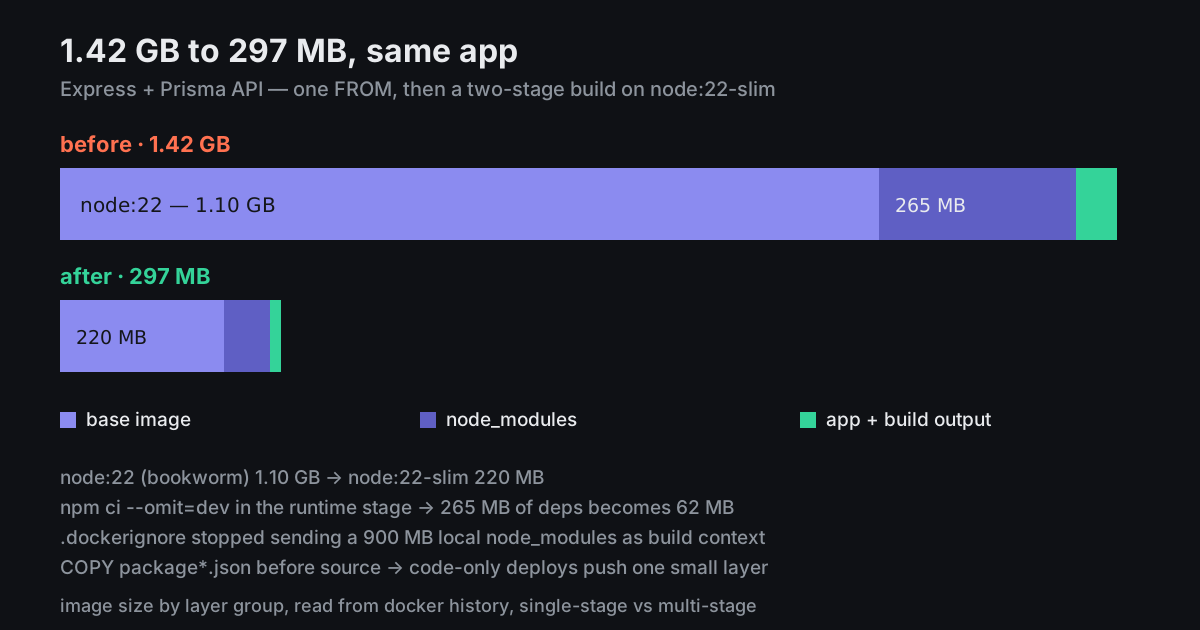
About 1.1 GB of it is the base image.
node:22is Debian bookworm with a full toolchain, python, git, the lot.node:22-slimis around 220 MB,node:22-alpinearound 150.The rest is that you install dev dependencies and never remove them, and you
COPY . .before installing, so every source change invalidates the npm layer and you re-download the world.Multi-stage, roughly:
That lands around 300 MB for a typical Prisma app. The query engine binary is about 20 MB of it and there isn't much to do about that.
Also add a
.dockerignorewithnode_modules,.gitanddist. Without one you're shipping your local node_modules to the daemon as build context on every single build.Reply
Report
@mulch_mule · 4mo ago
1.42 GB down to 297 MB. And the .dockerignore was sending a 900 MB local node_modules as context, which explains why even 'cached' builds felt slow.
Reply
Report
@negativesplitz · 4mo ago
The COPY ordering is the biggest quality-of-life fix in there. package.json first, install, then source — every build after the first skips the install layer completely.
Reply
Report