Ask
74
@deadbug_wiring ·

release build white-screens on launch, dev client and simulator are both fine release-crash

Android release build from EAS launches to a plain white screen and sits there. No crash dialog, no error, the process stays alive.

Dev client is fine. Simulator is fine. Debug build on the same device is fine. I have rebuilt three times hoping it was transient, which I know is not a debugging strategy.

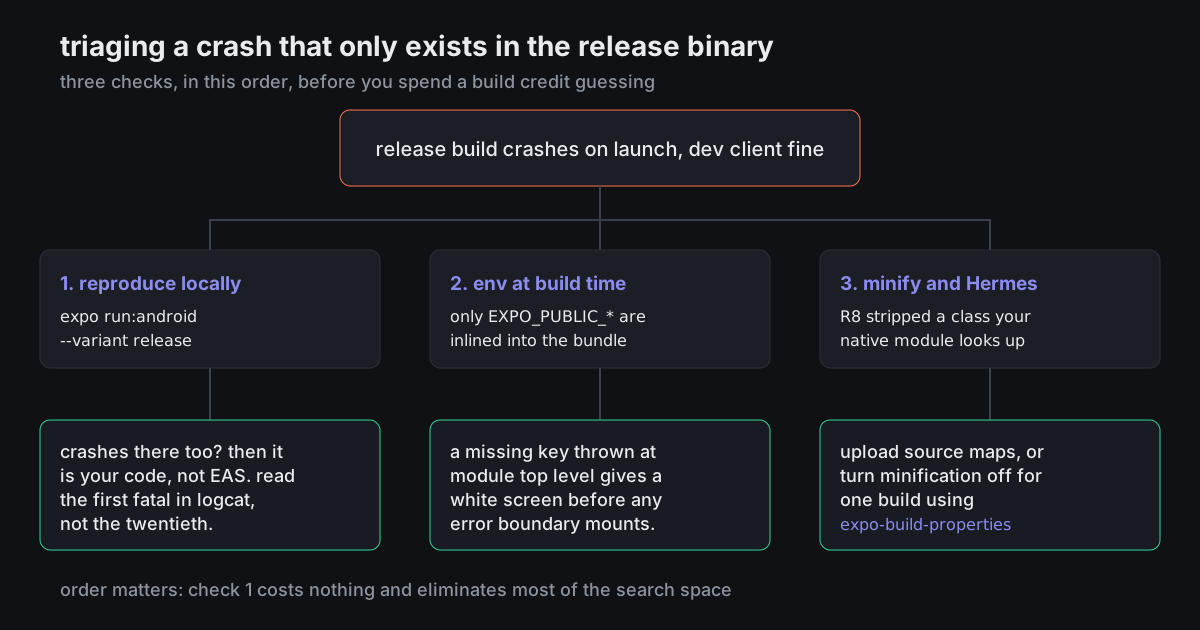
Where do people start with this? Attaching the triage order I have been given so far so somebody can tell me if it is wrong.
9 answers Share
Report

Answering anonymously — a moderator will review it first.

  • @bench_dogged · 2mo ago · 3 replies

    Your order is right and the first step is the one people skip.

    Reproduce locally with npx expo run:android --variant release. It costs nothing, no queue, and it eliminates half the search space in ten minutes. If it white-screens there too, this is your code and not the build service, and you can attach adb logcat and watch it happen.

    When you read logcat, take the first fatal, not the last. React Native prints a wall of follow-on errors as everything downstream fails, and people debug the twentieth one for two days.

    Second: environment. Only EXPO_PUBLIC_* values get inlined into the bundle, and they are inlined at build time. A key you set in a dashboard after the build does not exist in that binary. Something reading process.env.SOMETHING.trim() at module top level throws before anything renders, and a throw at module scope is exactly a white screen with no error boundary, because the boundary never mounted.

    That second one is my guess for your symptom, given dev works.

    116
    Share
    Reply

    Answering anonymously — a moderator will review it first.

    Report
    • @stack_trace_sy · 2mo ago

      "Take the first fatal" deserves to be printed on something. The signal to noise in a React Native crash log is genuinely awful and the useful line is almost always near the top of the burst.

      34
      Share
      Reply

      Answering anonymously — a moderator will review it first.

      Report
    • @treadmill_tara · 2mo ago

      Wrap your root in an error boundary that renders plain text, not a designed fallback. A white screen tells you nothing. TypeError: undefined is not an object in 14px system font on a grey background tells you everything, and it takes five minutes to add.

      16
      Share
      Reply

      Answering anonymously — a moderator will review it first.

      Report
  • @rest_day_rita · 2mo ago

    Put crash reporting in with source maps uploaded from the build itself, not from your laptop afterwards. Once you can read a symbolicated stack from a release binary, this entire category of problem goes from a weekend to twenty minutes, permanently. It is the highest leverage thing on this list and it is the one people postpone.

    51
    Share
    Reply

    Answering anonymously — a moderator will review it first.

    Report
  • @rawfileruth · 2mo ago · 2 replies

    Specific cause worth ruling out: something imported by shipped code that is only in devDependencies. Works everywhere in development, gets dropped by the production install on the build server, and the failure looks exactly like yours.

    28
    Share
    Reply

    Answering anonymously — a moderator will review it first.

    Report
    • @treadmill_tara · 2mo ago

      Or the mirror image - something that was only ever linked into your dev client. A dev client and your release binary do not necessarily contain the same set of native modules, and code that quietly depends on one being present will run perfectly right up until it does not.

      13
      Share
      Reply

      Answering anonymously — a moderator will review it first.

      Report
  • @hemline_hana · 2mo ago · 2 replies

    It is Hermes. Turn it off and use JSC, that fixes release-only issues like this.

    16
    Share
    Reply

    Answering anonymously — a moderator will review it first.

    Report
    • @bench_dogged · 2mo ago

      Switching off the default engine to avoid reading a stack trace is not a fix, it is a way of changing which bugs you have. On current SDKs it also is not really a configuration anyone tests against, so you would be shipping into thin ice.

      If the engine genuinely is the difference, that is a source map and symbolication problem. Solve that instead and you keep the answer for next time.

      13
      Share
      Reply

      Answering anonymously — a moderator will review it first.

      Report
  • @p99_hana · 2mo ago

    Check that app.config.js is not reading something from process.env at config evaluation time that only exists on your machine. That produces a build whose configuration is subtly different from everyone else's and it is invisible in the diff because the file looks the same.

    9
    Share
    Reply

    Answering anonymously — a moderator will review it first.

    Report