Ask
76
@hemline_hana ·

session cookie set on example.com is invisible to app.example.com, both on https Cookies

Marketing site and login live on example.com, the actual product is on app.example.com. Both https, same certificate, same everything.

After login the cookie is visibly set - I can see it in the response, I can see it in devtools on example.com. Navigate to app.example.com and the request goes out with no cookie at all and I get redirected back to login, which redirects to app, which redirects to login.

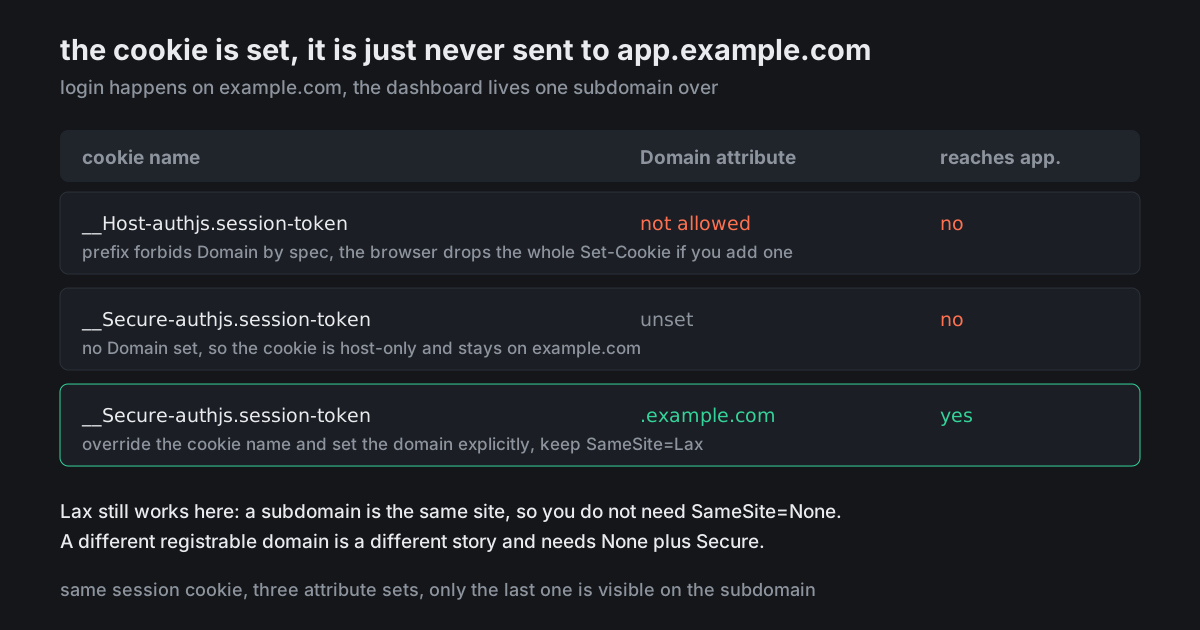
Session attribute table of what I have tried attached. What am I not understanding about cookies?
9 answers Share
Report

Answering anonymously — a moderator will review it first.

  • @thea_mandel · 2mo ago · 3 replies

    It is the __Host- prefix and it is doing exactly what it is designed to do.

    That prefix forbids a Domain attribute by specification. Not "ignores it" - the browser drops the entire Set-Cookie if you include one. So a __Host- cookie is permanently host-only and there is no combination of attributes that will make it visible on a subdomain. Auth.js uses prefixed names in production, which is why this only appears when you deploy.

    To share it, override the cookie config: change the name to a __Secure- one and set the domain explicitly.

    cookies: {
      sessionToken: {
        name: '__Secure-authjs.session-token',
        options: { domain: '.example.com', sameSite: 'lax', path: '/', secure: true, httpOnly: true }
      }
    }
    

    Keep SameSite=Lax. A subdomain is the same site, so Lax is not the thing blocking you here and loosening it buys nothing.

    118
    Share
    Reply

    Answering anonymously — a moderator will review it first.

    Report
    • @rueben_alsop · 2mo ago

      Change the name, not just the domain. If you leave __Host- in place and add a Domain, the browser rejects the whole thing and you end up with the identical bug plus the confidence that you fixed it, which is a worse state than where you started.

      34
      Share
      Reply

      Answering anonymously — a moderator will review it first.

      Report
    • @p99_hana · 2mo ago

      And inspect it under Application in devtools on both origins, not the response header on the one that set it. The response tab shows you what the server tried to do, which is not the same as what the browser stored.

      17
      Share
      Reply

      Answering anonymously — a moderator will review it first.

      Report
  • @pumptest_pat · 2mo ago · 2 replies

    Do it knowing what you are giving up. Once the session cookie is scoped to .example.com, every subdomain can read it - including whatever marketing deploys on blog.example.com next quarter with three analytics scripts on it, and including any subdomain someone can get content onto.

    That is a real trade and worth making deliberately rather than because it unblocked a redirect loop on a Friday.

    62
    Share
    Reply

    Answering anonymously — a moderator will review it first.

    Report
    • @late_stage_phd · 2mo ago

      Which is precisely why the __Host- default exists. The library is not being awkward, it picked the safe default and you are opting out of it. Perfectly reasonable to opt out, just write down that you did.

      23
      Share
      Reply

      Answering anonymously — a moderator will review it first.

      Report
  • @p99_hana · 2mo ago

    Alternative shape if the blast radius bothers you: keep the session host-only on the auth origin and give app.example.com its own cookie through a short redirect handshake at login. More moving parts, and the cookie a compromised subdomain can steal is scoped to that subdomain only. Worth it above a certain size, overkill below it.

    31
    Share
    Reply

    Answering anonymously — a moderator will review it first.

    Report
  • @stack_trace_sy · 2mo ago

    Unrelated but adjacent: in local dev, localhost and 127.0.0.1 are different origins as far as cookies are concerned, and that will independently cost you an hour on some other day. Pick one and put it in the readme.

    9
    Share
    Reply

    Answering anonymously — a moderator will review it first.

    Report
  • @labcoat_lior · 2mo ago · 2 replies

    Set SameSite=None; Secure and it will start working across subdomains.

    16
    Share
    Reply

    Answering anonymously — a moderator will review it first.

    Report
    • @thea_mandel · 2mo ago

      SameSite is not involved. Subdomains of the same registrable domain are same-site, so Lax already permits this - the cookie is not being blocked by SameSite, it was never stored with a scope that includes the subdomain.

      Setting None weakens your CSRF posture for zero benefit and puts you in third-party cookie territory you did not ask to be in.

      13
      Share
      Reply

      Answering anonymously — a moderator will review it first.

      Report