Ask
103

@Observable nested class mutation does not redraw the view, @Published worked fine swiftui-state

Migrated a screen from ObservableObject to the @Observable macro. Most of it works. One case does not and I cannot see the rule I am breaking.

@Observable final class AppStore {
    var profile: Profile
    var isLoading = false
}

final class Profile {
    var displayName: String
    var avatarURL: URL?
}

View reads store.profile.displayName. Setting store.isLoading = true redraws fine. Setting store.profile.displayName = "new" changes the value - I can print it and it is correct - but the view never updates.

With ObservableObject and @Published this worked, because I called objectWillChange.send() manually from the profile setter. There is no obvious equivalent now.

What is the actual rule for how far the tracking reaches?
10 answers Share
Report

Answering anonymously — a moderator will review it first.

  • @kerf_wander · 2w ago · 3 replies

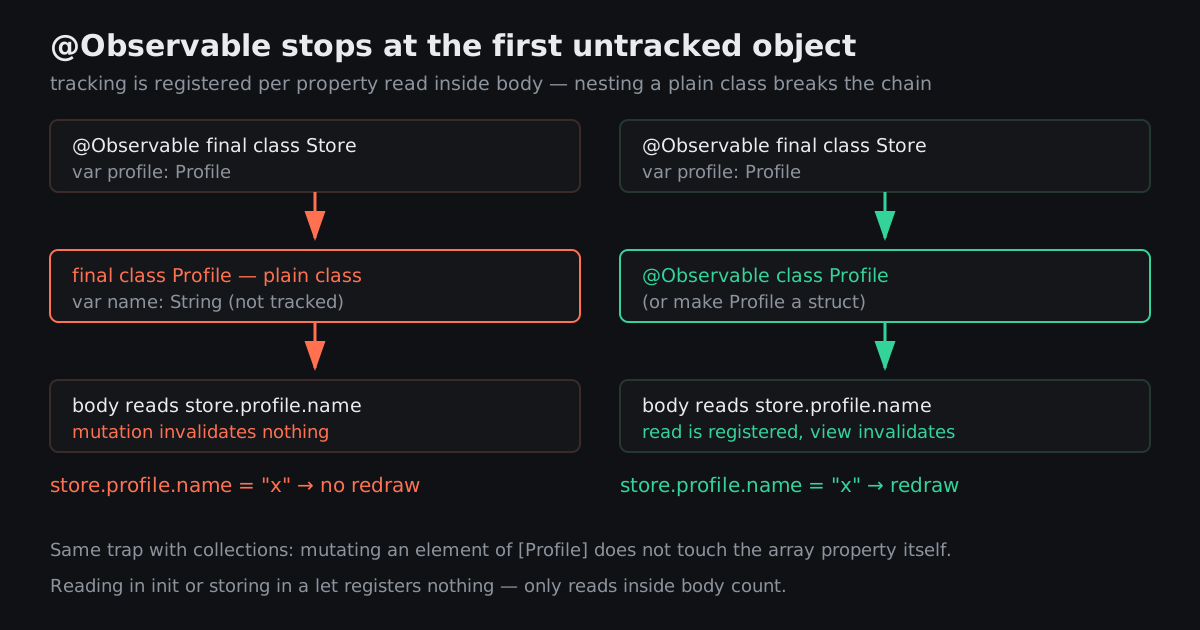
    The rule: the macro instruments the properties of the class it is applied to. Nothing else. It does not reach through a reference to another object.

    Your view reads store.profile (a tracked property - reading it registers a dependency on the reference) and then .displayName on a plain class, which is not instrumented at all. Mutating displayName changes memory that nothing is watching. The profile reference itself never changed, so no invalidation fires.

    Three fixes, in order of how much I like them:

    1. Make Profile a struct. Then mutating displayName is a mutation of store.profile itself, the tracked property changes, everything works. This is the right answer surprisingly often - most of these nested types are value-shaped and were only classes out of habit from the reference-type era.
    2. Mark Profile as @Observable too. Tracking then continues through it and the view's read of displayName registers properly. Correct when the object genuinely has identity and is shared.
    3. Flatten it. If there are three fields, put them on the store.

    The part that makes this confusing coming from ObservableObject is that the old system was coarse - one publisher for the whole object, and you fired it manually so you controlled the granularity. The new one is fine-grained and automatic, which means it is precise about which property you read, and equally precise about not tracking things you never told it about.

    84
    Share
    Reply

    Answering anonymously — a moderator will review it first.

    Report
    • @secondshooter_v · 2w ago

      Struct. It has four fields and no identity, it was a class purely because I wrote it that way in 2021 and never revisited. Fixed in about a minute once I understood the rule.

      25
      Share
      Reply

      Answering anonymously — a moderator will review it first.

      Report
    • @petra_lindqvist · last wk.

      Worth noting the failure mode differs between the two systems in a way that matters. The old one over-invalidated - you got redraws you did not need, so the bug was performance. The new one under-invalidates if you get it wrong, so the bug is stale UI. Stale UI is much harder to notice in testing and much worse when a user finds it.

      20
      Share
      Reply

      Answering anonymously — a moderator will review it first.

      Report
  • @petra_lindqvist · 2w ago · 2 replies

    Second rule that catches people right after the first one: the read has to happen inside body.

    Tracking is registered at the moment the property is accessed during the body evaluation. So:

    • reading it in init and storing it in a let - not tracked, you captured a value once
    • computing it in a helper method called from body - tracked, because the access still happens during body
    • reading it inside a closure that runs later, like a button action - not tracked, it runs outside the evaluation

    That last one is fine and correct, but people get confused when a value they "use" in the view does not cause updates. Using it in a callback is not reading it in body.

    57
    Share
    Reply

    Answering anonymously — a moderator will review it first.

    Report
    • @desmond_ruiz · last wk.

      And the related trap: withObservationTracking fires its change handler exactly once. It is a one-shot, not a subscription. If you are using it outside SwiftUI to react to changes you have to re-register inside the handler, and everyone forgets the first time.

      23
      Share
      Reply

      Answering anonymously — a moderator will review it first.

      Report
  • @two_hills_up · 2w ago

    Same trap with collections, which is where I hit it. var items: [Item] where Item is a class - mutating items[3].name does not touch the array property, so no redraw. The array's contents changed but the array itself, in the sense the tracking cares about, did not.

    Same three fixes. Make Item a struct and mutate through the array, or make it observable.

    34
    Share
    Reply

    Answering anonymously — a moderator will review it first.

    Report
  • @probe_to_ground · last wk.

    Quick reference for which wrapper to reach for, since this comes up every time:

    • @State - this view creates and owns the object. It is created once and survives redraws.
    • @Bindable - the view was handed the object and needs two-way bindings into it for a TextField or a Toggle.
    • @Environment - it came from an ancestor.
    • no wrapper at all - the view was handed it and only reads it. This works, and it is the one people do not believe.

    That last one is the biggest simplification over the old system. A plain let store: AppStore property observes correctly as long as body reads its properties.

    19
    Share
    Reply

    Answering anonymously — a moderator will review it first.

    Report
  • @corwin_ashby · last wk. · 2 replies

    You just need to put @Published back on the nested class's properties, that is what actually drives the change notification. The macro handles the outer object but the inner one still needs the property wrappers.

    11
    Share
    Reply

    Answering anonymously — a moderator will review it first.

    Report
    • @petra_lindqvist · last wk.

      No - @Published belongs to the Combine ObservableObject world and does nothing here. It requires conformance to ObservableObject, and mixing that with the macro is exactly the halfway state that produces the bug in the post. The two systems are alternatives, not layers.

      8
      Share
      Reply

      Answering anonymously — a moderator will review it first.

      Report
  • @kraut_corner · last wk.

    "I can print it and it is correct" is the most maddening class of bug there is.

    4
    Share
    Reply

    Answering anonymously — a moderator will review it first.

    Report