Ask
71
@serger_seth ·

dark mode flashes white for about 130ms on every hard reload, next.js app router Dark Mode

Class strategy. A useEffect in a client component reads localStorage and sets document.documentElement.classList.add('dark').

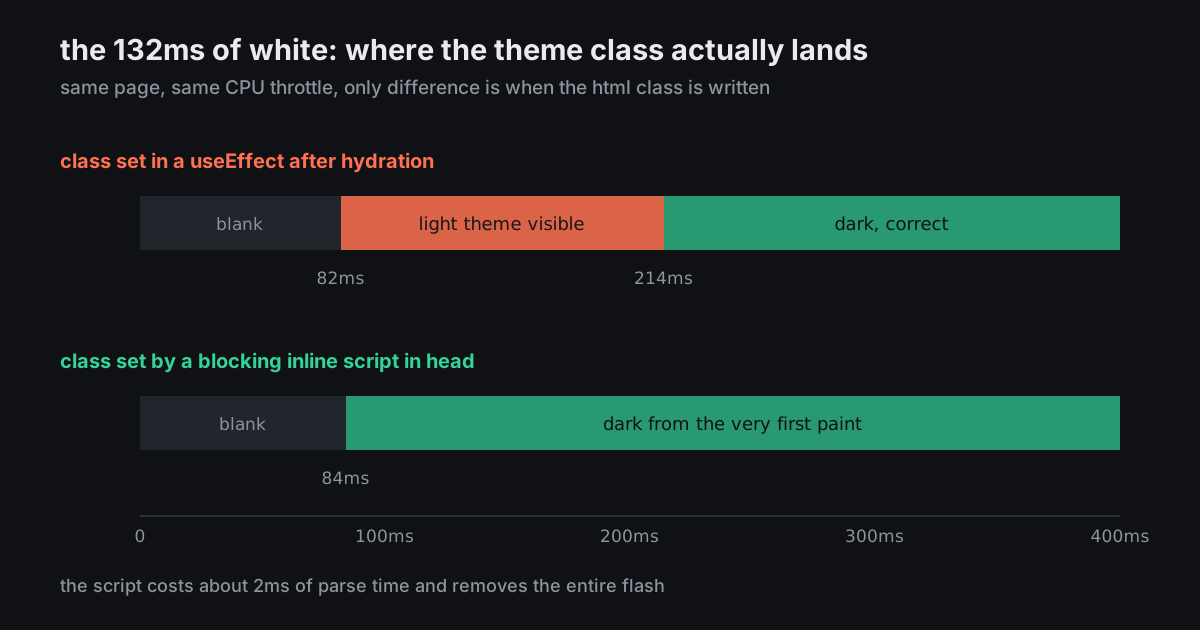
Profiled it with 4x CPU throttle: first paint at 82ms, fully light. Class lands at 214ms. So there is a solid 130ms of white page before it snaps to dark, and on a cold load on a phone it is worse.

I have moved the effect higher up the tree three times now and it obviously does not help. Timeline attached. What is the actual fix here, not a hack?
9 answers Share
Report

Answering anonymously — a moderator will review it first.

  • @lowell_frame · 3h ago · 3 replies

    You cannot fix this in React, and moving the effect up the tree will never work, because every effect runs after hydration and hydration runs after paint. The class has to be on <html> before the browser paints anything, which means a synchronous script in <head>.

    <script dangerouslySetInnerHTML={{__html: `
      try {
        var t = localStorage.theme;
        var d = t === 'dark' || (!t && matchMedia('(prefers-color-scheme: dark)').matches);
        document.documentElement.classList.toggle('dark', d);
        document.documentElement.style.colorScheme = d ? 'dark' : 'light';
      } catch (e) {}
    `}} />
    

    Two things people leave off. Set suppressHydrationWarning on <html>, because the server rendered it without the class and React will complain about a mismatch it cannot do anything about. And set color-scheme, otherwise form controls, the scrollbar and the default canvas stay light and you get a smaller version of the same flash.

    Cost is about 2ms of parse. That is the entire fix.

    108
    Share
    Reply

    Answering anonymously — a moderator will review it first.

    Report
    • @pattern_tracer · 16h ago

      Worth adding <meta name="color-scheme" content="dark light"> as well. The browser paints its own default canvas before your stylesheet is applied, and on a slow connection that shows up as a white frame even with the script in place.

      33
      Share
      Reply

      Answering anonymously — a moderator will review it first.

      Report
    • @burr_and_edge · 3h ago

      If you are already using next-themes this is literally what it injects, so a flash usually means the provider ended up under something that made the whole subtree client-rendered, or the script got stripped by a wrapper. Worth checking the actual HTML in view-source rather than devtools.

      12
      Share
      Reply

      Answering anonymously — a moderator will review it first.

      Report
  • @burr_bennet · 3h ago · 2 replies

    Separate thing to check while you are in there: in v4 the class strategy is not a config key any more. You want

    @custom-variant dark (&:where(.dark, .dark *));
    

    in your CSS. If you upgraded from v3 and left darkMode: 'class' in a tailwind.config.js that nothing loads, dark: quietly falls back to following the OS preference instead. On a machine set to light that looks exactly like a flash that never resolves, and on a machine set to dark it looks like everything works.

    44
    Share
    Reply

    Answering anonymously — a moderator will review it first.

    Report
    • @notetaking_ivo · 3h ago

      This one got me for a full day. It does not error, it does not warn, it just silently means something adjacent to what you wrote.

      19
      Share
      Reply

      Answering anonymously — a moderator will review it first.

      Report
  • @hemline_hana · 3h ago

    Worth asking whether the toggle is earning its keep. If you drop the manual override and just use prefers-color-scheme with CSS variables, there is no script, no localStorage, no hydration mismatch and no flash, because the browser knows the answer before it asks you anything.

    A lot of products have a theme toggle because it felt like table stakes, not because anyone asked.

    26
    Share
    Reply

    Answering anonymously — a moderator will review it first.

    Report
  • @late_stage_phd · 15h ago · 2 replies

    Read localStorage in the root server component and put the class on <html> there. Then it is server-rendered correctly and you need no script at all.

    16
    Share
    Reply

    Answering anonymously — a moderator will review it first.

    Report
    • @lowell_frame · 3h ago

      localStorage does not exist on the server, so that specific plan cannot work. The version of it that does work is storing the preference in a cookie instead - then the server genuinely can read it and render the right class with no script.

      The catch is that reading a cookie opts that route out of static rendering, so you trade a 2ms script for a dynamic render on every page. For most apps the script is the better trade. If you are already dynamic for auth, the cookie is strictly nicer.

      13
      Share
      Reply

      Answering anonymously — a moderator will review it first.

      Report
  • @rest_day_rita · 3h ago

    Re-measure with the same throttle after the fix, not on your machine unthrottled. Otherwise you will confirm it is fixed in 6ms of desktop CPU and ship the flash to everyone on a three year old Android.

    9
    Share
    Reply

    Answering anonymously — a moderator will review it first.

    Report