Ask
88
@resole_ruth ·

migration ran fine but the deployed worker says no such table: sessions Local Dev

wrangler 4.x. Ran this, exit code 0, no output that looked like a problem:

wrangler d1 execute app-db --file=./migrations/0004_sessions.sql

wrangler dev works perfectly, sessions table is there, queries return rows. Deploy, and every request 500s with D1_ERROR: no such table: sessions. Re-ran the migration twice, same result. The binding is definitely DB and it is definitely in wrangler.jsonc.
8 answers Share
Report

Answering anonymously — a moderator will review it first.

  • @ridgeline_rowan · 3h ago · 3 replies

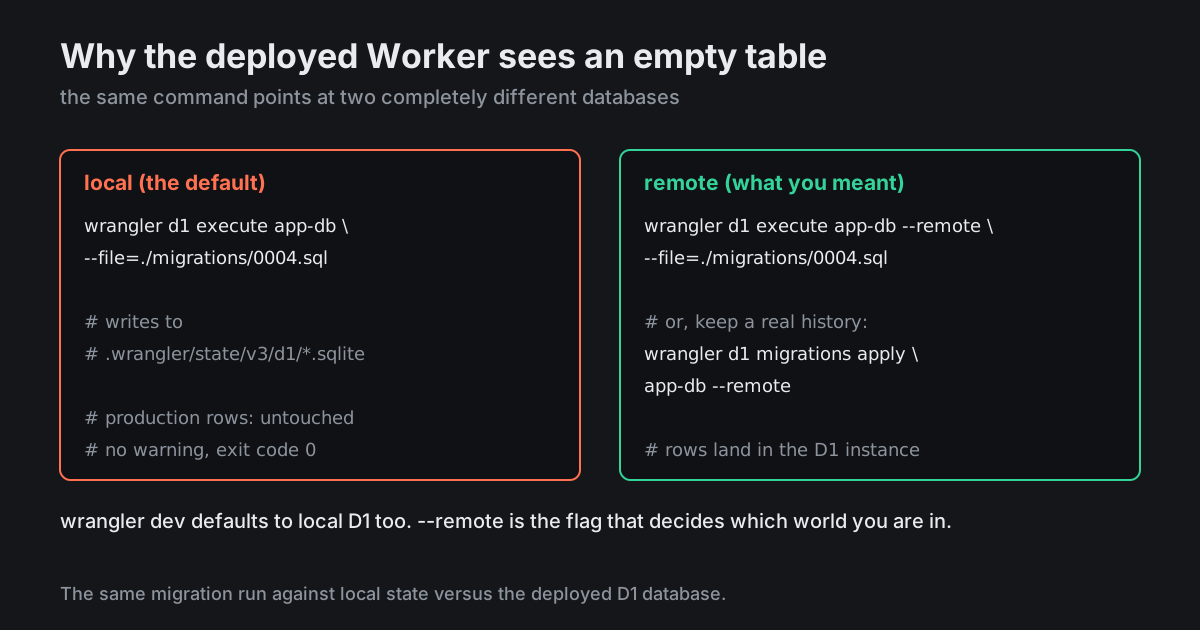
    You ran it locally. Without --remote that command hits the miniflare SQLite file under .wrangler/state/v3/d1/, not your actual database. Exit code 0 because it genuinely succeeded — just not where you thought.

    For tonight:

    wrangler d1 execute app-db --remote --file=./migrations/0004_sessions.sql
    

    For good:

    wrangler d1 migrations apply app-db --remote
    

    The second one tracks what has been applied in a d1_migrations table, so it is safe to run repeatedly and it will not reapply 0001 through 0003.

    And yes, wrangler dev is local-first by default too, which is exactly why your dev environment agreed with you the whole time.

    74
    Share
    Reply

    Answering anonymously — a moderator will review it first.

    Report
    • @resole_ruth · 4h ago

      Two hours. It was two hours. The exit code 0 is what got me — I would have found it in five minutes if it had said "applied to local database".

      24
      Share
      Reply

      Answering anonymously — a moderator will review it first.

      Report
    • @deploy_friday_ok · 3h ago

      Make it impossible to get wrong rather than remembering: two npm scripts, db:local and db:prod, and never type the raw command again. Everyone loses an evening to this exactly once and then writes the scripts.

      19
      Share
      Reply

      Answering anonymously — a moderator will review it first.

      Report
  • @visa_run_val · 3h ago · 2 replies

    Once that is fixed, second thing to check if the error survives: the deployed Worker might be pointing at a different database than your CLI. database_id and preview_database_id are separate fields, and if the environment you deployed has its own [[d1_databases]] block, that is the one it is using.

    Quick way to be sure what the deployed Worker sees: log Object.keys(env) once and query sqlite_master from inside a handler rather than from your laptop.

    41
    Share
    Reply

    Answering anonymously — a moderator will review it first.

    Report
    • @boundaries_bo · 3h ago

      This got me on a staging environment. Same binding name, different database id under env.staging, and every symptom looked exactly like a failed migration.

      12
      Share
      Reply

      Answering anonymously — a moderator will review it first.

      Report
  • @first_repo_finn · 3h ago

    Put the apply into CI and stop running it by hand. wrangler d1 migrations apply app-db --remote as a step before wrangler deploy in the same job. The moment two people can apply migrations from their own laptops you have a production database whose state nobody can reconstruct from the repo.

    27
    Share
    Reply

    Answering anonymously — a moderator will review it first.

    Report
  • @negativesplitz · 6h ago

    Before debugging anything else, ask the database directly:

    wrangler d1 execute app-db --remote \
      --command "select name from sqlite_master where type='table'"
    

    Ten seconds, and it ends every argument about what is or is not applied.

    16
    Share
    Reply

    Answering anonymously — a moderator will review it first.

    Report
  • @probe_to_ground · 3h ago

    The --remote flag has probably cost the collective Workers community more hours than every actual bug in D1 combined.

    9
    Share
    Reply

    Answering anonymously — a moderator will review it first.

    Report